FreePhoto retouching

Retouch photos right in your browser

Clean up a portrait, a family snapshot or an old scan. The Spot Healing Brush, Healing Brush and Clone Stamp repair marks by hand, and remove object clears larger things. All of them are on the free plan, and your photos never leave your device.

Drop your photo hereIt opens in the editor. Nothing is uploaded. Choose a photoJPGPNGWebPHEICPSDRAW

No photo? Try ours

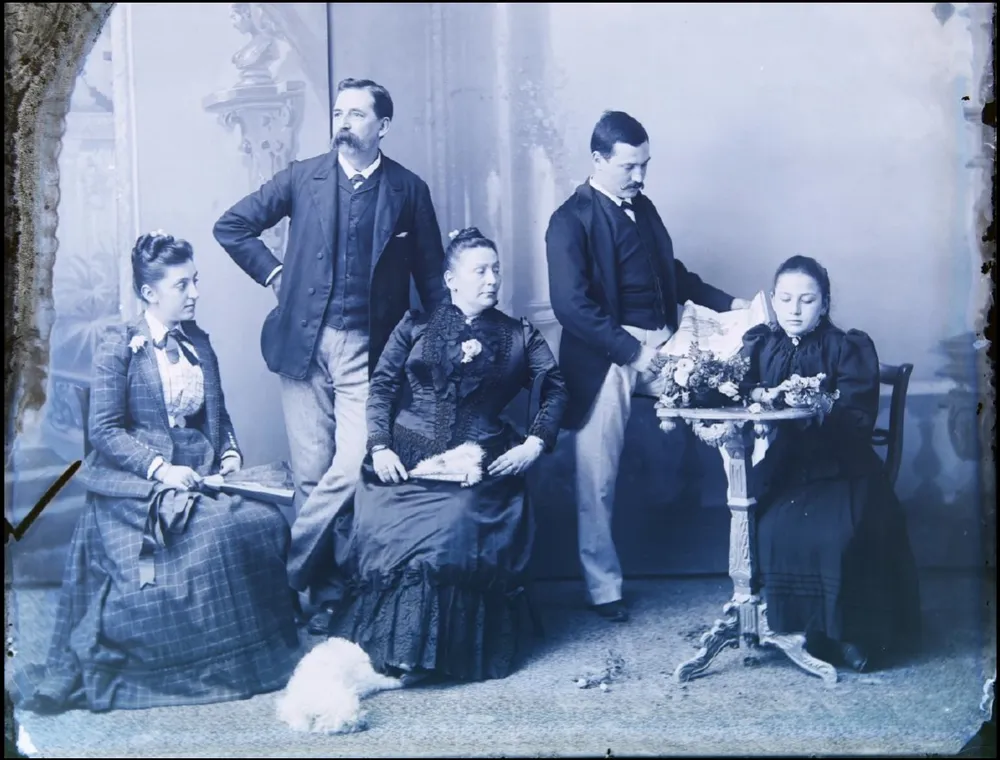
An 1880s studio portrait of a family, scanned with dust, scratches and a crease

0 of 3 fixed

Live demo01 / 04

01Restore in steps

Slide from scan to print.

Damage on an old print comes in layers. Fix the dust first, then the scratches, then the crease. Each step is one tool, and you can stop at any stage and keep the result.

The family portrait at the stage: Raw scan

03How it works

Three steps. Seconds.

  1. 01Open the photoAny JPEG, PNG, WebP, PSD or Camera RAW file.
  2. 02Retouch the small thingsPress J until the Spot Healing Brush is active, then paint over spots and dust. Press S for the Clone Stamp to copy detail by hand.
  3. 03Remove larger objectsPaint over a person, sign or wire and let go. The space is filled with matching background.

04Why CutLift

Built to be the best one

  • Spots and dustSpot Healing Brush: paint over a mark and it blends into the area around it.
  • Texture and detailHealing Brush and Clone Stamp, with Alt-click to set the source.
  • Whole objectsRemove object fills large areas with matching background, and generative fill (Pro) handles complex ones.
  • Undo and privateEvery step can be undone, and your photos never leave your device.

Free and unlimited. CutLift Pro adds batch processing, upscaling, sky replacement and studio exports for $7.99/month.

05The guide

A full retouch kit

Which tool for which job

Online photo retouching covers a few distinct tasks. The Spot Healing Brush clears small spots and dust with no source. The Healing Brush copies texture from a clean area you Alt-click and blends it into the colours around the flaw, which suits larger marks on skin or fabric. The Clone Stamp copies pixels exactly, for repeating patterns, straight edges and detail that must stay sharp. Remove object clears whole things such as people, signs or wires.

All four are free, and they cycle with J, apart from the Clone Stamp on S.

Every brush has Size and Hardness settings. The Clone Stamp adds Opacity and Flow, and both the Clone Stamp and Healing Brush have an Aligned option that decides whether the source follows every stroke or starts again from the same point.


A retouching order that works

Start with the largest problems and finish with the smallest. Remove distracting objects first, then fix lines and patterns with the Clone Stamp, then heal small spots. Straighten and crop with the Crop tool, then adjust light and colour last with Levels, Curves, Exposure or Hue/Saturation in the Image menu, so your tone changes are not affected by later healing.

For shape changes, Liquify in the Filter menu lets you push and smooth areas by hand.

Check your progress now and then with Compare before / after in the View menu, which helps you notice when a retouch has gone too far.

Restoring old scans and family photos

Scanned prints often have dust, creases and faded colour. Heal the dust with the Spot Healing Brush, rebuild creases with the Clone Stamp, then use Levels to restore contrast. A torn corner can often be filled with Remove object, or Generative fill (Pro) in the Edit menu. Small or low-resolution scans can be enlarged with Upscale, which is part of CutLift Pro.

Retouch photos online, privately

This photo retouching software runs in your browser, with no install, and opens JPEG, PNG, WebP, PSD and Camera RAW files. Every step can be undone, and you can save a project or a Photoshop (PSD) file to carry on later. Nothing is uploaded, which matters for client work and family pictures alike.

06Questions

Good to know

Is photo retouching free online?

Yes. The healing brushes, clone stamp and remove object are all on the free plan.

Retouch photos right in your browser

Free to start. Your photo never leaves your device.

Open the editor

49 more tools

Keep going
























